An environment typically qualifies as a high density wireless network if more than 30 client devices connect to a single AP. High-density environments include sports stadiums, university auditoriums, casinos, event centers, and theaters.
Planning:
The basic planning parameters comprise of what is expected from the network. Wi-Fi is no more about only providing coverage but about performance and throughput hence it is important to consider the following factors during deployment-
- Applications that will be used in the environment.
- Number of clients connected in the environment at one given time.
- Client device capabilities (802.11 a/b/g/n/ac/ax, number of spatial streams)
- Areas to be covered.
It is important to understand the aggregate throughput required to support the kind of applications that will be used in the environment because the throughput requirement varies significantly for data browsing app to a streaming app to VoIP based app. The below table shows the throughput requirement based on the type of traffic.
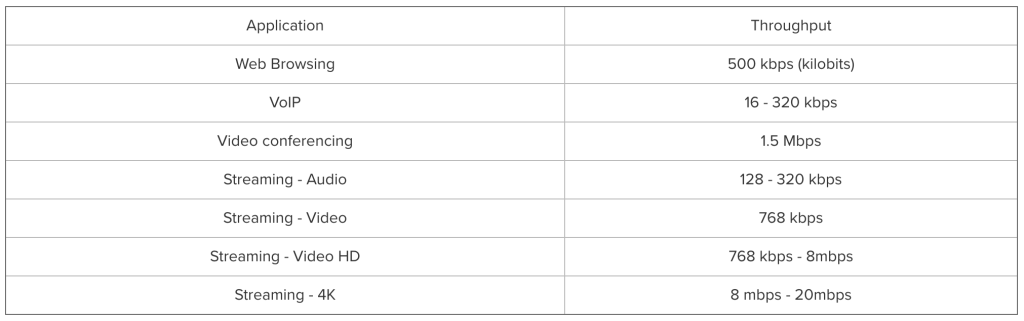
Although understanding the application throughput requirement is important, it is equally important to understand the capabilities of the client devices used in the environment. The client device capabilities viz. supported 802.11 protocols, number of antennas, number of spatial streams significantly affects the the throughput that the client device is capable of getting. Typically new devices are capable of 802.11 a/b/g/n if not 802.11 ac/ax. To determine the approximate AP count, one can use the following equation
AP count (based on throughput) =Aggregate application throughput/client device throughput.
The table below shows the throughput chart based on client device capability.
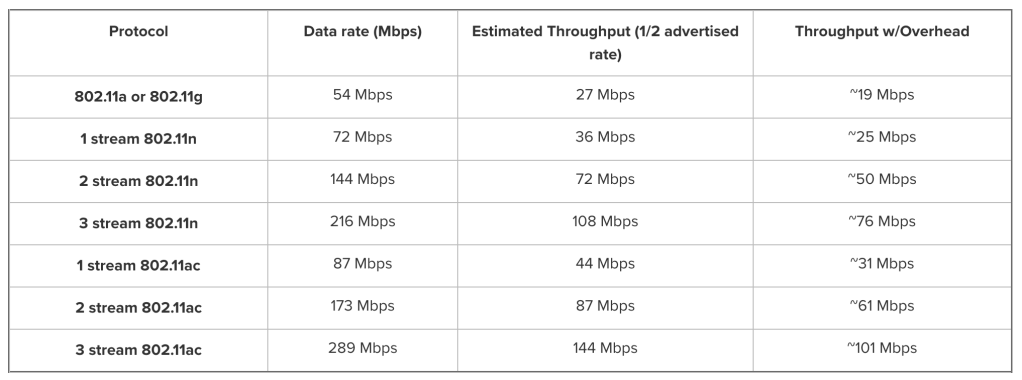
In high density, throughput is not the only criteria you also need to consider device count from a ‘Capacity Planning’ perspective.
AP count (based on device count)= Total number of 5 GHz clients connected together/25
Remember, this mathematics is just giving you the AP count but the wireless design is equally important.
Wireless Design and AP placement:
For wireless design and AP placement especially in high density, I prefer the following methods based on the scenarios:
- Existing Wireless Network: If there is an existing wireless network deployed in the environment, I typically determine the appropriate AP locations and count by performing a Predictive RF design using Ekahau based on the environment information and requirements gathered from the customer. Followed by this, I perform a Passive Site Survey to determine the performance of the existing network. I also try to align the new AP locations with the old ones to avoid new cable runs, Passive Site Survey helps significantly with deciding these AP locations.
- New Wireless Network: If it is a new wireless deployment, I typically determine the appropriate AP locations and count by performing a Predictive RF design using Ekahau based on environment information and requirements. Followed by this, an AP on stick with Ekahau helps confirm the design.
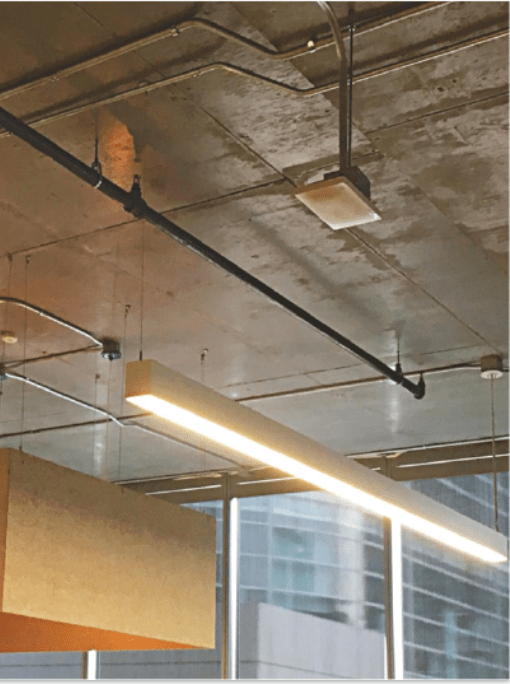
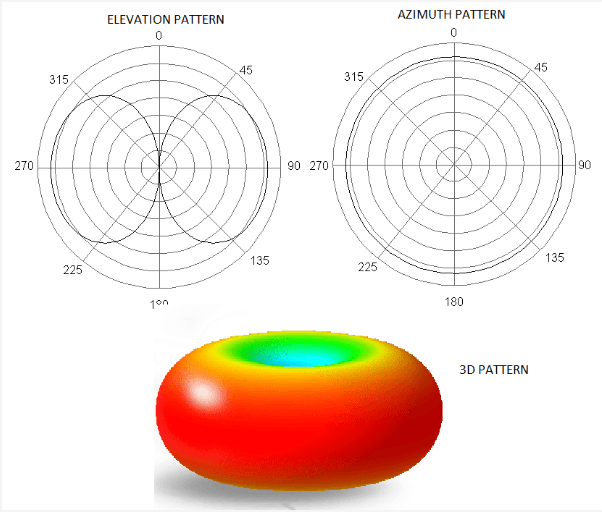
AP orientation and antenna selection is also equally important to determine that radiation pattern of the antennas is ideal. In most of the high density environments like stadiums, theaters the ceiling height is very high. For the AP radiation power to reach the client devices, it is important to mount the APs at lower height and also with the correct orientation. APs with omnidirectional antennas are mostly mounted facing downwards. In some cases customers use sectored or directional antennas in stadiums but then one should plan the design accordingly. The image below shows typical omnidirectional antenna based AP mounting followed by the radiation pattern of the AP antenna.
Configuration Considerations:
- SSID Configuration: With high density deployments, it is very important that we configure the wireless network such that maximum airtime is dedicated to data traffic than management traffic. More number of SSIDs result in excessive beacon traffic affecting the data throughput significantly. It is recommended not to have more than 3 SSIDs and merge as many as SSIDs as possible and use Network Access Control (NAC) or Captive Portal to bifurcate the client device traffic using only one SSID.
- Radio Settings: These are the important radio settings to be considered-
- Band Selection: It is important to force client devices to 5 GHz channel to get better throughput considering the high utilization on the 3 usable 2.4 GHz channels viz. 1, 6 and 11. I suggest using ‘Dual Band operation with Band steering’ wherein the AP forces a client device to connect to 5 GHz radio if it detects that the client device is capable of connecting to 5 GHz radio.
- Power Settings: APs set to maximum or static power setting result in excessive overlapping areas causing performance issues. It is recommended that you set the APs to automatic power reduction so that the APs adjust their power levels based on the decision made by the controller/cloud. This also helps if an AP goes offline because the neighboring APs bump their power level to accomodate for the coverage area.
- Channel Width: Although increasing the channel width to 80 MHz provides more bandwidth this is not a recommended setting for high density environments wherein there are large number of APs and we need to ensure channel reusability. Using 80 MHz channel width in these environments is going to result in channel overlap causing performance degradation because of interference. Using 20 MHz channel width provides sufficient usable channels for the APs without interfering with the neighboring APs.
- Channel Settings: I suggest using dynamic channel assignment so that the AP switches its channel when the interference on the channel it is broadcasting is jammed.
- Minimum Bitrate: Minimum bitrate is a critical setting to ensure smooth roaming between APs and avoiding sticky clients. Typical setting is 11 Mbps but if the service area are overlapped considerably in high density environment and the minimum bitrate can be increased to 18 or 24 Mbps.
Related Blogs
Deployment Guides
Common Wireless Network Mistakes
Education Institutes Wi-Fi Deployments
Quick Reads
Why are network admins configuring multiple WLANs?
Why channel planning is critical?
 blogscisco.com